Green Ginkgo Leaves Watercolor and Vector Clipart: A Practical Guide to Getting the Most from This Versatile Set
If you have ever spent hours searching for the perfect botanical element only to end up with something that looks flat, pixelated, or mismatched with your project, you are not alone. The right set of watercolor clipart can save time, elevate your design, and open creative doors you did not know existed. The Green Ginkgo Leaves Watercolor and Vector Clipart collection is one of those rare finds that combines hand-painted artistry with practical file formats, but like any resource, knowing how to choose, use, and apply it makes all the difference between a polished result and a frustrating one.
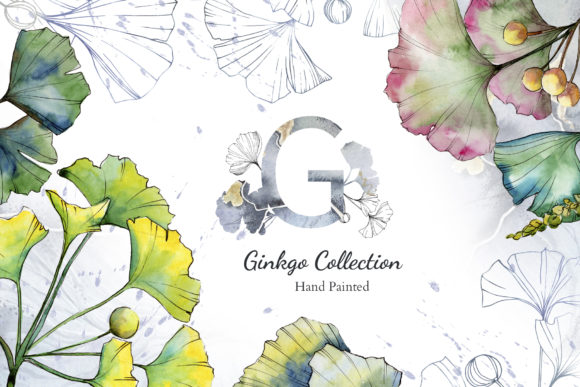
This collection includes 69 files in total: 45 PNG files, 12 JPG files, and 12 EPS files, covering frames, borders, patterns, and isolated illustrations. Every element is hand-painted, highly detailed, and delivered at 300 dpi. The PNG files come without a background, while the patterns and frames are provided as JPGs at a generous 3500x3500 pixels. Whether you are designing wedding invitations, greeting cards, social media quotes, blog headers, or posters, this pack offers remarkable flexibility. But to truly benefit from it, you need to avoid a few common pitfalls that even experienced designers sometimes miss.
Choosing the Wrong File Format for Your Project
One of the most frequent mistakes people make with this type of clipart set is grabbing the wrong file format for their intended use. The pack includes three formats, and each serves a different purpose. The PNG files are ideal when you need an element with a transparent background—think placing a single ginkgo leaf over a colored surface or layering multiple leaves without white boxes around them. The JPG files work best for full backgrounds, textures, or patterns where you do not need transparency. The EPS files are vector-based, meaning you can scale them infinitely without losing quality, and they are fully editable in programs like Adobe Illustrator.
A common error is using a JPG pattern when a transparent PNG would let you overlay it more naturally, or relying on a PNG when you actually need the scalability of an EPS. Before you start designing, ask yourself: Do I need to resize this element significantly? If yes, reach for the EPS file. Do I need a seamless background for a poster? The JPG pattern files are your best bet. Do I want a single leaf floating over a photo? Use the PNG. Matching the format to the task eliminates extra work and preserves the quality of the hand-painted artwork.
Overlooking the Power of Editable Vectors
Another overlooked detail is the editable nature of the EPS files. Many people treat every file in the pack as a finished image and never explore the vector versions. That is a missed opportunity. Because the EPS files are fully editable, you can change colors, resize without distortion, rotate, combine, and even break apart elements to create something entirely new. If you are designing a wedding invitation suite and want the ginkgo leaves to match a specific sage green or gold accent rather than the original green, the vector files let you make that adjustment in seconds.
Those who skip the vector files often end up stuck with the original colors or resolution limits. Take a few minutes to open the EPS files in a vector editing program. Even if you are not an advanced user, simple adjustments like changing a leaf’s hue or scaling it up for a poster are straightforward and dramatically expand what you can do with the set. The hand-painted look remains intact because the vectors were created from hand-painted originals, so you are not sacrificing artistry for flexibility.
Misunderstanding Resolution and Print Readiness
The pack is described as ready to print, and it truly is—provided you use the files correctly. All PNGs are 300 dpi, which is the standard for professional printing. The JPG patterns and frames are 3500x3500 pixels, also print-ready at a good size. However, a mistake people sometimes make is assuming that because a file is high resolution, it can be stretched to any dimension. While the vector EPS files can scale infinitely, the PNG and JPG files have fixed pixel dimensions. If you try to enlarge a PNG leaf far beyond its original size, you may notice softening or pixelation.
To avoid this, check the file dimensions before you start. If you need a single leaf to cover half a poster, use the EPS version. If you are working with the PNG files, keep them at or near their original size for the crispest results. The 300 dpi resolution means they will look excellent in print at typical sizes—think greeting cards, invitation details, or small posters. For larger format prints, scale up the vector versions. Understanding these boundaries prevents disappointment and ensures your final product looks as refined as the original artwork.
Ignoring the Variety of Elements in the Pack
With 69 files, it is easy to fixate on a few favorite leaves and never explore the full range. The pack includes not only isolated leaves but also frames, borders, and patterns. Each of these can serve as a foundation for an entire design. A common oversight is using only the isolated elements when a pre-made frame or pattern could save hours of layout work.
For example, if you are creating a blog header, you might spend time arranging individual leaves into a border. But the pack likely includes a frame that already does that beautifully. If you are designing a background for a quote graphic, a pattern file can give you a consistent, seamless texture in seconds. Before you start assembling elements from scratch, browse through all 69 files. You may find that the perfect border or background already exists. This approach speeds up your workflow and lets you focus on customizing rather than constructing from zero.
Neglecting Background Removal Needs
One of the strongest selling points of this set is that the PNG files come without a background. That means no tedious cutting out or using the magic wand tool. Yet, some users still encounter trouble because they do not check whether the transparency is preserved when they import the file into their software. Certain programs, especially older or free versions, may insert a white background behind transparent PNGs if the file is not handled correctly.
To avoid this, always open a PNG file in a program that supports transparency—Photoshop, GIMP, Canva Pro, or similar. When placing the image, look for a checkerboard pattern indicating transparency. If you see a solid white background, your software may be converting it. Save or export your project in a format that preserves transparency, such as PNG or GIF, rather than JPG. Taking this small precaution ensures the hand-painted ginkgo leaves float naturally over your design without ugly white boxes.
Failing to Test Colors Before Printing
Because the elements are hand-painted watercolor, the greens in the files are rich and varied. However, what you see on your screen may differ from what prints on paper. Screens display in RGB, while printers typically use CMYK. If you are printing at home or through a professional service, convert your file to CMYK beforehand or request a test print. The EPS vector files give you the advantage of adjusting colors precisely, so use that capability if the printed greens look too cool or too warm.
Additionally, the JPG pattern files may look slightly different when printed at full size due to the way watercolor textures translate to paper. Ordering a small proof before printing a large run of invitations or posters is always wise. This avoids wasting materials and ensures the final product matches your vision.
Underestimating the Value of Hand-Painted Details
Finally, do not treat these elements as if they were generic digital clipart. Each leaf, frame, and pattern was painted by hand, which means subtle variations in texture, opacity, and brushstroke. This is a strength, not a flaw. Some users mistakenly try to smooth out or overly edit the watercolor effects, stripping away the very quality that makes the set special. Instead, lean into the organic feel. Pair ginkgo leaves with soft typography, natural textures, or minimalist layouts. Let the watercolor texture be the hero.
If you are creating wedding invitations, for instance, a watercolor ginkgo border paired with a clean serif font creates a look that is both elegant and natural. For a blog post about mindfulness or wellness, a single leaf PNG placed next to a quote feels intentional and calm. The hand-painted quality adds depth that flat vector clipart cannot replicate. By respecting that artistry and using it thoughtfully, your projects will stand out.
Practical Takeaways for Better Results
To sum up, here is what to keep in mind when using the Green Ginkgo Leaves Watercolor and Vector Clipart collection:
- Match the file format to your task—PNG for transparent overlays, JPG for backgrounds, EPS for scalable edits.
- Open the EPS files and experiment with color and size changes. You can customize the hand-painted art without losing its character.
- Respect resolution limits for PNG and JPG files; use vectors for large-scale projects.
- Browse every file before designing. Frames and patterns can save significant time.
- Confirm that your software handles PNG transparency correctly.
- Test print colors, especially if you are producing something in quantity.
- Let the hand-painted watercolor texture shine—do not over-edit it.
Whether you are a small business owner creating product packaging, a blogger designing visual content, or a hobbyist making personalized greeting cards, this pack gives you a versatile, high-quality foundation. The key is using it with intention. Check your file choices, explore the full set, and trust the hand-painted details to do what they do best. Your designs will look more polished, your workflow will be smoother, and you will get the most value out of every single leaf.