Unlock Your Creativity with Pineapple Watercolor Art: A Complete Guide to Using PNG Clipart and JPG Patterns for DIY Projects
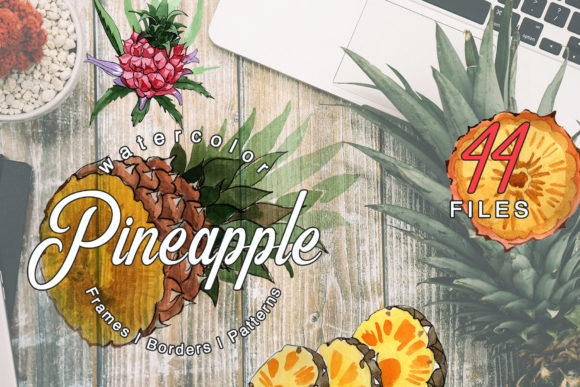
In the world of creative design, few motifs capture warmth, hospitality, and tropical flair quite like the pineapple. Whether you're planning a summer wedding, designing a set of whimsical greeting cards, or sprucing up your blog visuals, pineapple watercolor illustrations offer a versatile and beautiful solution. This article explores the rich possibilities of using a curated collection of pineapple watercolor PNG clipart and JPG pattern files—44 high-resolution resources that can transform any project from ordinary to extraordinary.
We'll walk through what these files are, why they matter for DIY enthusiasts and professional designers alike, and how you can put them to practical use in your next creative endeavor. By the end, you'll have a clear understanding of how to leverage hand-painted watercolor elements for invitations, posters, social media graphics, home decor, and more.
What Exactly Is Pineapple Watercolor Clipart?
Pineapple watercolor clipart refers to digital illustrations of pineapples created using watercolor painting techniques, then scanned or photographed at high resolution. Each piece retains the organic, fluid look of real watercolor—soft edges, gradient washes, and subtle texture—making it distinct from flat vector graphics or stiff stock photography.
A typical premium pack, such as the one described here, contains 44 individual files organized into several categories:
- 7 PNG files — individual pineapple illustrations, floral accents, leaves, or other elements isolated on transparent backgrounds. Perfect for layering over other designs.
- 37 JPG files — full frames, borders, seamless patterns, and standalone images at 3500x3500 pixels, ready for print or digital use.
All illustrations are hand-painted, meaning no two strokes are exactly alike. This gives each file a unique, artistic character that adds warmth and authenticity to any project.
Why Choose Watercolor Over Other Styles?
Watercolor has exploded in popularity over the last decade, especially in the DIY and small-business design community. The reasons are both aesthetic and practical:
Organic and Inviting
Unlike rigid, geometric designs, watercolor feels organic and approachable. The subtle bleeding of pigment and variations in opacity create a sense of depth and softness that invites the viewer in. For wedding invitations or baby shower cards, this gentle quality conveys emotion and care.
Versatile Across Media
Because watercolor pineapple png files come with transparent backgrounds, you can place them onto any colored paper, digital canvas, or textured surface without unsightly white boxes. This is crucial for professional-looking results in both print and web design.
Highly Detailed Yet Forgiving
The hand-painted nature of these files means they contain real brush strokes, paper grain, and water bloom effects. These details make them stand out, yet the soft edges blend easily with other design elements—perfect for beginners who may not have perfect cutting or masking skills.
Breaking Down the File Types: PNG vs. JPG
Understanding the difference between PNG and JPG formats helps you use each file to its full potential.
| Feature | PNG (7 files) | JPG (37 files) |
|---|---|---|
| Background | Transparent | White (or colored) |
| Best Use | Overlaying on other designs | Full backgrounds, patterns, frames |
| Resolution | 300 dpi (print quality) | 3500x3500 px (high resolution) |
| File Size | Larger (supports transparency) | Smaller (compressed) |
The 7 PNG files are your go-to for compositing. Want a pineapple floating above a frame? Need to place a cluster of leaves in a corner without covering your background? Use the PNG files. The 37 JPG files include full patterns, borders, and textured backgrounds—ideal for filling an entire page or card base.
Practical Applications: Where to Use Pineapple Watercolor Elements
Let's explore real-world uses for this collection. The possibilities are truly endless, but these categories cover the most common scenarios for DIY creators, small business owners, and hobbyists.
1. Wedding and Event Invitations
Tropical-themed weddings are perennial favorites. A watercolor pineapple featured on the invitation suite immediately signals a lively, warm celebration. Use the JPG frames to create borders around your text, then layer a PNG pineapple illustration as a focal point. Pair with gold foil accents or calligraphy for a luxury feel.
Tip: Because the files are 300 dpi, you can print them on cardstock at home or through a professional printer without loss of quality.
2. Greeting Cards and Stationery
From birthday cards to thank-you notes, the pineapple motif works for nearly any occasion. The patterns included in the JPG set can be used as the card's background or as envelope liners. The isolated PNG elements are perfect for die-cut style cards or for adding dimension with foam adhesive dots.
3. Blog and Social Media Graphics
Bloggers and social media managers often struggle to find unique, non-stock imagery. Pineapple watercolor art provides a signature look that stands out in a crowded feed. Use a pattern as a blog post background, or add a PNG pineapple to your Instagram quote cards. The transparent background means you can place it over any gradient or photo.
4. Posters and Wall Art
At 3500x3500 pixels, the JPG files are large enough to print as poster-sized wall art (up to about 11x14 inches at 300 dpi). Frame a beautiful border illustration or use a pattern as a full print. The hand-painted quality makes them look like original watercolor paintings, not digital replicas.
5. DIY Home Decor
Print the patterns on fabric transfer paper for throw pillows, or use them to decoupage on wooden trays and coasters. The watercolor aesthetic blends well with boho, coastal, and modern farmhouse decor styles.
6. Scrapbooking and Journaling
For memory keepers, these clipart files are a dream. Print multiples at different sizes, cut them out, and layer them into layouts. The hand-painted look adds an artistic, professional touch to personal albums.
How to Get the Best Results: A Beginner's Workflow
If you're new to using digital clipart and patterns, here is a simple workflow that will help you achieve polished results:
- Choose your software. Most users will work in Canva, Adobe Photoshop, Illustrator, Procreate, or even Microsoft PowerPoint. All of these programs support PNG and JPG files.
- Start with a background. Select one of the JPG patterns or a solid color that complements the warm yellows and greens of the pineapple illustrations.
- Add your PNG element. Drag in the isolated pineapple or floral accent. Because the background is transparent, it will sit naturally over your chosen base.
- Resize and rotate. The files are fully editable in size and color (if you use software that supports hue/saturation adjustments). You can flip, rotate, or scale elements to fit your composition.
- Layer and combine. Use multiple PNG files to create a custom arrangement—maybe a central pineapple framed by leaves and small blossoms.
- Add text. Use a clean sans-serif font for modern looks or a script font for romantic styles. Keep text readable against the watercolor background.
- Export at high resolution. When your design is complete, export as a PDF for print or PNG for web.
Remember: because all illustrations are hand-painted, slight irregularities in color and texture are part of the charm. Don't try to perfect them—embrace the organic feel.
Common Misconceptions About Watercolor Clipart
Let's clear up a few misunderstandings that new users sometimes have:
Misconception 1: "Watercolor clipart looks cheap or fake."
Reality: High-quality hand-painted watercolor, scanned at 300 dpi, is virtually indistinguishable from original artwork. The key is the source—mass-produced vector traces look artificial, while true watercolor scans retain texture and life.
Misconception 2: "I need advanced design skills to use these files."
Reality: Not at all. With transparent PNG files, you literally drag and drop. The JPG patterns are ready to use as-is. Beginners achieve professional-looking results in minutes.
Misconception 3: "PNG files are only for web use."
Reality: At 300 dpi, these PNG files are fully print-ready. They will reproduce beautifully on paper, cardstock, fabric, and other media.
Why This Pack Is a Smart Investment for Creatives
A collection like this—with 44 individual files spanning both PNG and JPG formats—offers exceptional value. You get a cohesive set of illustrations that all share the same artistic style, color palette, and level of detail. This consistency is difficult to achieve by mixing free resources from different sources.
Whether you are a:
- Small business owner creating product packaging, labels, or marketing materials
- Event planner designing custom invitations and signage
- Teacher or educator making classroom decorations or lesson materials
- Hobbyist scrapbooker preserving memories with artistic flair
- Graphic designer looking for high-quality assets to save time
...this pack provides the foundation for countless projects. The frames and borders alone can save hours of design time, while the isolated PNG elements give you the flexibility to customize endlessly.
Tips for Choosing the Right Pineapple Watercolor Set
When shopping for a watercolor clipart collection, keep these criteria in mind:
- Resolution: Look for 300 dpi minimum for print projects.
- File variety: A mix of isolated elements (PNG) and full backgrounds/patterns (JPG) offers the most flexibility.
- Hand-painted vs. digital: Hand-painted art has subtle imperfections that add warmth.
- Commercial use rights: Always check the license if you plan to sell products made with the files.
- Color palette: Ensure the colors fit your brand or event theme. Tropical yellows, greens, and blush tones are common in pineapple watercolor sets.
Final Thoughts: Bringing Warmth and Creativity to Your Projects
Pineapple watercolor clipart is far more than a collection of pretty images—it's a creative toolkit that empowers you to design professional, heartfelt, and visually engaging material without needing advanced artistic skills. The combination of PNG and JPG formats in a 44-file pack gives you everything from isolated elements to full backgrounds, making it suitable for invitations, greeting cards, posters, blogs, home decor, and beyond.
Because each illustration is hand-painted and highly detailed, your finished projects will carry a sense of authenticity and care that resonates with viewers. Whether you're designing for a wedding, a business, or personal joy, these watercolor elements offer a beautiful, versatile foundation.
So dive in—experiment with layering, try different color adjustments, mix patterns with isolated elements, and see where your creativity takes you. The only limit is your imagination.